
Download SuperAnimo – Animation, GIF, Character, Image Editor
Overview
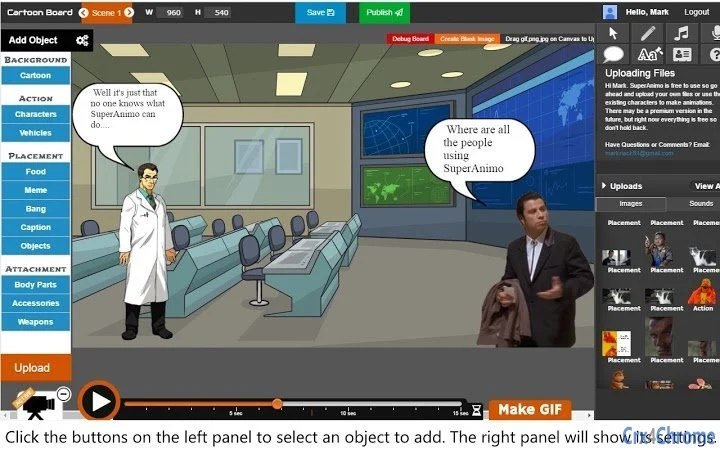
SuperAnimo is a desktop animation tool designed for users who want to create short, expressive animations with minimal effort. The software enables users to animate characters, text bubbles, and other visual elements using intuitive controls. It’s particularly suited for hobbyists, content creators, and educators looking to produce animated stories, memes, or simple scenes for social media. The tool simplifies the animation process by allowing users to drag and hold to animate characters or action objects, while text and placement objects require path-based point setting for movement. This approach makes it accessible to beginners while still offering creative flexibility.
Users can enhance their animations with effects such as rotation, scaling, and hiding characters to transition between scenes. The built-in image editor allows for direct editing of assets—users can paste images onto character faces or search external sources like Giphy and Pixeden for custom visuals. The timeline-based workflow supports step-by-step storytelling, where writing text automatically extends the timeline, enabling a natural narrative flow. The software also supports sound, drawing, zooming, and robot voice effects, adding depth to animations. Although still in development, SuperAnimo shows promise as a lightweight tool for creating animated content reminiscent of short-form shows like South Park.
Key Features & Capabilities
- Character and Action Object Animation – Animate characters or "ACTION" objects by clicking and dragging, enabling fluid motion across the canvas.
- Path-Based Movement for Text and Placement Objects – Set key points along a path to define movement for text or "PLACEMENT" objects, ideal for precise animation sequences.
- Integrated Image Editor – Edit images directly within the app; paste images on character faces or crop visuals from Giphy and Pixeden.
- Timeline-Driven Storytelling – Write text to automatically extend the timeline, allowing users to build step-by-step narratives.
- Export to GIF with One Click – Use the "Make Gif" button to quickly export animations in GIF format for sharing.
- Effects and Enhancements – Apply rotation, scaling, hide characters, add sound, use robot voices, and draw directly on the canvas for playback.
- Scene Breakdown for Long Animations – Split scenes to create longer, multi-segment animations, supporting more complex storytelling.
These features are ideal for creating animated memes, educational content, or short comedic sketches. For example, a user can draw a character, add a text bubble with dialogue, animate it along a path, and export it as a GIF in under a minute. The ability to integrate external assets from Giphy and Pixeden expands creative possibilities without requiring external editing tools.
User Interface, Workflow & Performance
SuperAnimo features a clean, canvas-centric interface that places the animation workspace at the center of the screen. Navigation is straightforward, with tools and controls arranged in accessible panels. The timeline is clearly visible and directly tied to the visual elements, allowing users to adjust timing and positioning with precision. The drag-and-drop functionality for adding images, GIFs, and sound supports a fluid workflow, especially for users creating story-driven animations.
Workflow efficiency is enhanced by the automatic timeline extension when text is added, reducing manual setup. The ability to draw directly on the canvas and have it play back as part of the animation introduces a unique interactive layer. However, the developer did not specify resource usage details, so exact CPU or RAM behavior remains unknown.
Performance observations are based on general software behavior patterns. Stability is expected to improve with future updates, as the software is still a work in progress. The interface remains responsive during basic operations, though complex scenes may vary in responsiveness depending on system capabilities.
Compatibility & System Requirements
SuperAnimo is compatible with both Windows and Mac operating systems. The software has a file size of 100MB, indicating a lightweight installation that should not require significant disk space. The supported platforms are clearly listed, but exact system requirements such as minimum RAM, processor speed, or GPU support were not provided. The developer did not specify whether the software requires administrator privileges or has specific dependency requirements.
Compatibility information was partially provided. Users should ensure their system meets standard desktop application requirements for smooth operation. The software is currently available as a desktop application, with plans for a mobile version on iOS and Android expected this summer. No additional compatibility notes were included in the release details.
Pros and Cons
Pros
- Intuitive drag-and-drop animation for characters and action objects
- One-click GIF export for quick sharing
- Integrated image editor with access to Giphy and Pixeden
- Timeline-based storytelling with automatic extension
- Support for sound, robot voices, and drawing playback
- Lightweight at 100MB with no reported installation issues
- Future mobile app plans for iOS and Android
Cons
- Software is still in development with no official tutorials available
- Exact system requirements were not listed
- Performance under heavy workloads not documented
- No real-time collaboration or cloud sync features
- Limited export formats beyond GIF
FAQ Section
Is SuperAnimo compatible with Windows and Mac?
Yes, SuperAnimo is available for both Windows and Mac operating systems.
Can I use external images in my animations?
Yes, you can search and import images from Giphy and Pixeden directly within the app, and edit them using the built-in image editor.
Is the software free to download and use?
Yes, SuperAnimo is currently available as free software with no cost for download or use.
Does SuperAnimo support video export formats other than GIF?
Currently, the primary export format is GIF. No additional formats were specified in the release information.
Will there be a mobile version of SuperAnimo?
Yes, the developer has confirmed that a mobile app for iOS and Android is expected to be released this summer.
Final Thoughts + CTA
SuperAnimo delivers a surprisingly robust set of tools for creating animated content, especially for users interested in short-form storytelling and meme creation. Its intuitive interface, combined with features like one-click GIF export and built-in image editing, makes it accessible to beginners while still offering enough depth for creative experimentation. The timeline-driven workflow and support for sound, drawing, and robot voices add layers of engagement that enhance the final output.
While still in development, the software shows strong potential, particularly for educators, social media creators, and fans of animated sketches. The lack of tutorials and incomplete documentation are minor drawbacks, but the active development roadmap suggests ongoing improvements. For those seeking a free, lightweight animation tool with a focus on fun and accessibility, SuperAnimo is a compelling choice.
Download SuperAnimo now to start creating your own animated stories, memes, and short videos today.







